
Queues
Ring strategies, agent priorities, wrap-up time, position and hold-time announcements, and overflow when a queue is full.
Onyx Voice is a complete business phone system: extensions and auto attendants, call centre queues, desk phones that set themselves up, softphones for Windows and Android, and a live operations console that shows every call as it happens. Run it on your own hardware, or let us host it for you.
The features people expect from a PBX, set up in plain language: say where a call should go, and Onyx builds the call plan for you.
A number and a phone for every person, voicemail with a PIN and greetings, and new messages sent by e-mail.
"Press 1 for sales, 2 for support": menus with your own recordings and hold music, uploaded in any common audio format.
Route calls one way during opening hours and another after hours, with holidays and an override from any phone.
One number that rings a team, overhead paging groups and intercom.
Phone numbers, outbound routes with failover between carriers, caller ID rules and emergency numbers, set up from forms that explain themselves.
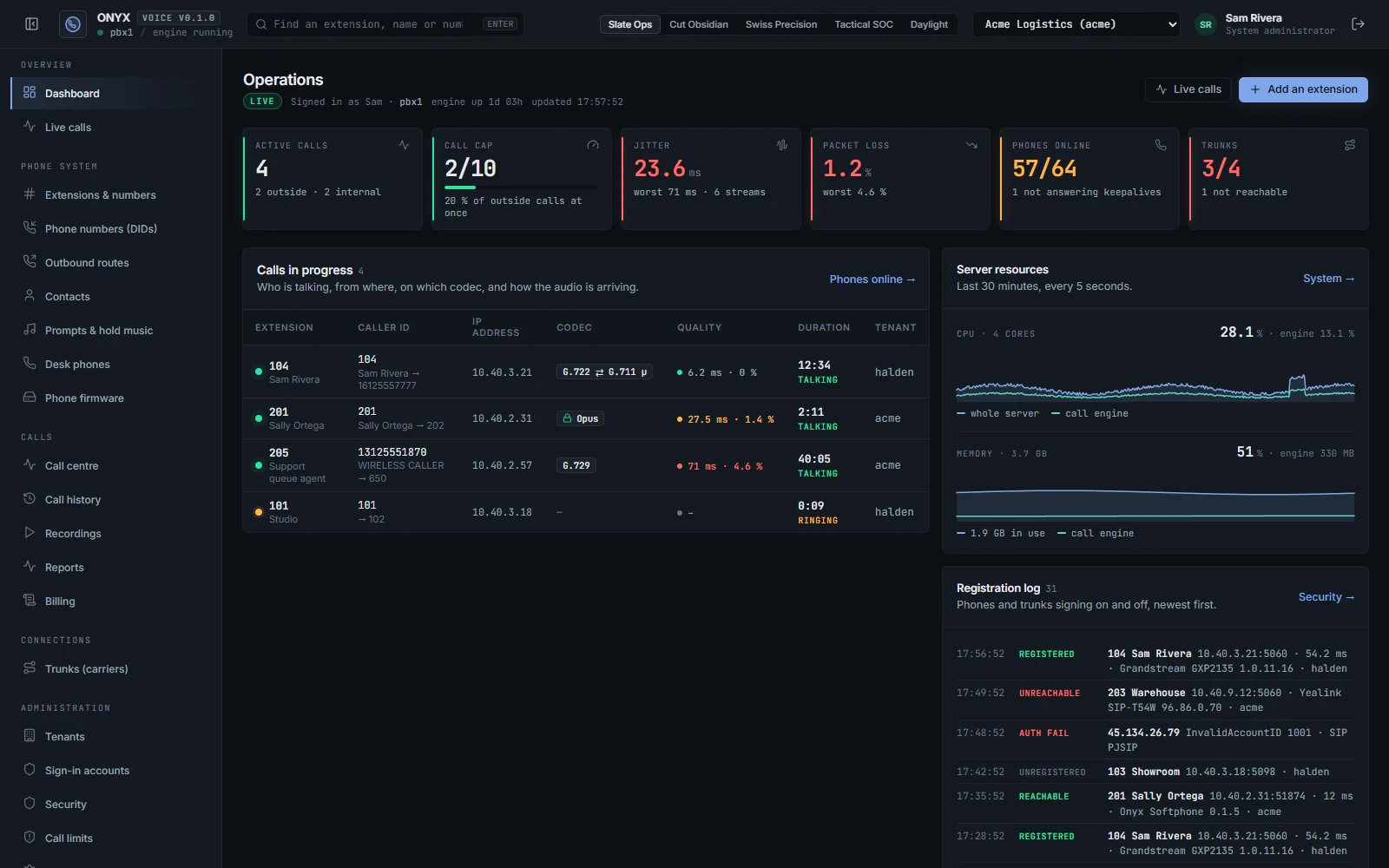
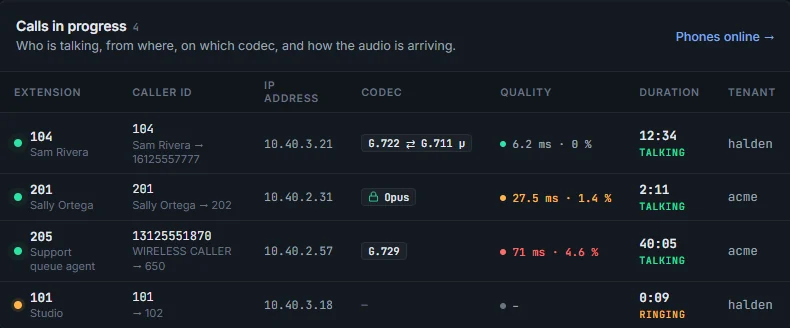
A console built for the people who keep the phones running: live numbers at the top, the calls in progress with their audio quality, the server's own health, and every company on the server at a glance.

Each company has its own numbers, phones, administrators and users. A system administrator sees them all.
Slate Ops for the operations desk, plus Cut Obsidian, Swiss Precision, Tactical SOC and a light Daylight theme.
Voicemail, recordings, call history and call forwarding for every person, and a softphone in the browser.
Built in, not an add-on: answer more calls, keep callers informed, and coach agents while they talk.
Ring strategies, agent priorities, wrap-up time, position and hold-time announcements, and overflow when a queue is full.
Callers waiting, the longest wait and every agent's state, refreshed every three seconds.
Supervisors listen in, coach the agent without the caller hearing, or join the call.
Callers press 1 to hang up and keep their place; the next free agent is connected first, then the caller is called back.
Answered, abandoned and waiting times per queue and per agent, with CSV export.
Receptionists see who is free, drag a call onto a person to transfer it, and pick up parked calls.
Desk phones at factory settings find the server on their own network, fetch their settings and register: extension, line keys, busy lamps, phonebook and time zone.
Tested so far on Grandstream GXP2135 and GXP1625 desk phones. The other templates follow each maker's documentation and are being checked on real hardware.
The user portal has a softphone: call, answer and transfer from any modern browser, with encrypted audio.
Onyx Softphone for Windows: a tray app with a dial pad, caller ID, missed calls and updates that install themselves.
Onyx Softphone for Android, ringing like a normal call on the phone's own call screen.
In development.
A phone system on the internet is a target. Onyx blocks the attackers and limits what a stolen password could cost.
Addresses that keep guessing SIP or console passwords are blocked at the firewall, automatically.
International calling off by default, premium numbers blocked, and caps on calls at once, calls per hour and daily spend.
SIP over TLS and SRTP audio for phones and trunks that support it, with a free Let's Encrypt certificate.
Authenticator-app codes for administrators and users, recovery codes, and a switch that makes them required.
Onyx Voice is its own small operating system, built on Ubuntu Server 24.04 LTS with PostgreSQL and the call engine included. Start it, answer a few questions on the console, and sign in to the console in your browser.
The same phone system either way. Choose where it lives.
Install the appliance on your own hardware or virtualization. Calls between your phones stay on your network, and you decide when to update.
DownloadWe run the server, its updates and its backups. You manage your people, numbers and phones in the same console, and your phones register with us.
Talk to usVersion 0.1.0, a preview release.
Downloads ask for a user name and password. Ask us for access.
Start a server or a virtual machine from it. It asks for the network and the disk, and needs no internet connection to install.
Download the ISO · coming soonA ready-made disk for a Generation 2 VM with Secure Boot. New-OnyxVM.ps1 creates and starts the VM.
Deploy it in vSphere, or open it in Workstation or Fusion, choose the network and start it.
Download the OVA · coming soonFor an existing Ubuntu Server 24.04 machine: install the engine package first, then Onyx Voice.
2 CPU cores, 4 GB of memory and 40 GB of disk for a small office; more disk for call recordings. 64-bit x86.
For the people on the phone system. They sign in with their extension's details from the user portal.
A tray app with a dial pad, caller ID and missed calls. It updates itself from our signed feed.
Rings on the phone's own call screen. Install the APK; allow installs from your browser when Android asks.
In development.
Older releases stay available, for a test lab or to match a server you already run.
This is the first release; earlier versions will be listed here.
The call engine inside Onyx Voice is open-source software under the GNU General Public License, version 2. Its complete source, and how we build it, is here for anyone, without a password.
Call engine Asterisk 22.11.0, unmodified, with pjproject 2.17, as in every image and package on this page.
Written offer: for at least three years after we last distribute a release, Larström Technologies gives anyone who asks the complete corresponding source of the GPL software in it, including the Ubuntu packages in the images, for no more than our cost of providing it. Contact us, or write to Larström Technologies, 2210 4th Ave S, Minneapolis, MN 55404.
On the open-source Asterisk 22 LTS call engine, which handles the calls themselves. Onyx installs it, writes all of its configuration and watches it; you never edit its files. Everything you work with, the console, the portal, the phone templates and the apps, is Onyx's own.
The call engine is unmodified Asterisk with the pjproject library it bundles, both under the GNU GPL version 2. Their source and our build recipe are under Source code above, free to download. The images also contain Ubuntu Server packages, whose source is in Ubuntu's archive; we send any of it on request. The rest of Onyx Voice is our own software.
Any standard SIP phone can register. Onyx sets up phones from Yealink, Poly, Grandstream, Cisco (MPP), Fanvil, Snom, Htek and CyberData by themselves. So far Grandstream GXP2135 and GXP1625 desk phones are tested; the other templates follow each maker's documentation and are being checked on real hardware.
Any SIP trunk provider, with registration or by IP address. For common US providers the number format, caller ID and tech prefix are filled in for you.
Yes. Each company on the server has its own extensions, numbers, phones, administrators and limits, and sees only its own calls. That is how we host it, and it works the same on your own server.
A physical server or a virtual machine on Hyper-V, VMware or another hypervisor: 2 CPU cores, 4 GB of memory and 40 GB of disk for a small office, more disk if you record calls. A public address with the SIP and audio ports forwarded if phones or carriers connect from the internet.
For now by installing the new packages from this page. A signed update repository, like the one our mail server uses, is being set up; servers will then update from the console.
It is a preview. The features above work and are tested on our lab server with real calls, but it has not yet run a business's phones. Talk to us before relying on it.
It depends on the number of extensions and numbers. Contact us and we will tell you.
Tell us how many people, numbers and locations you have, and we will tell you how Onyx Voice fits.